Media Sync Staging to Prod by Volade
Mehrere WooCommerce-Shops, ein Netzwerk.
Multi-Shop Sync by Volade synchronisiert Produkte, Bestellungen, Kunden und Einstellungen zwischen zwei WooCommerce-Shops - keine Middleware, kein SaaS, zusatzliche Shop-Paare auf V+.
3-Schritt-Workflow
- 1MSSP auf beiden Shops installieren und verbinden
- 2Sync-Richtung und Felder konfigurieren
- 3Manuell starten oder automatisch planen
Agency pain point
Multi-Shop - ein haufiges ungelostes Problem
You migrate the database, deploy the theme, flush caches — then broken images and missing PDFs appear in production. MSSP closes the gap with a hash-indexed manifest pull over WordPress REST.
$0
Cloud storage relay fees
Market pricing comparison 2026
Ohne MSSP
WP Migrate DB Pro charges the Media add-on on top of the DB license. All-in-One Unlimited, Duplicator Pro and paid sync plugins add $59–199 per agency — often with cloud relay or SSH required.
No per-site license · no per-GB fees · no account
~$149
WP Migrate Media / yr
$0
MSSP by Volade
4 Sync-Richtungen, konfigurierbare Felder und Konflikt-Auflosung - mehrere WooCommerce-Shops als ein Netzwerk.
4
Sync-Richtungen
2
Shops im Free-Tier
KEI-NE
Middleware erforderlich
WP-CLI
Sync per Cron
Auf einen Blick
Agenturen pushen Inhalte auf Staging, aber Medienbibliotheken driften vor dem Start auseinander. WP Migrate DB Pro Media kostet ~$149/Jahr; FTP ist fehleranfällig; rsync benötigt SSH auf beiden Hosts; Cloud-Relays berechnen pro GB. Media Sync Staging to Prod by Volade verbindet Produktion mit Staging über WordPress REST — gemeinsamer geheimer Schlüssel, hash-indiziertes Manifest, nur fehlende Dateien ziehen. Vier Voreinstellungen (Agenturübergabe, WooCommerce-Katalog, letzte 30 Tage, Probelauf), kostenloser JSON-Export und wp-mssp-CLI — keine Cloud-Speichergebühren, kein Konto erforderlich.
Screenshots
Ganzseitige echte Admin-Oberfläche — Voreinstellungen, Diagnose und detaillierte Einstellungen.
Warum mehrere WooCommerce-Shops (noch) nicht miteinander sprechen
Manueller Export/Import zwischen Shops vs. ein Sync-Tool, das Daten in beide Richtungen halt.
Das Multi-Shop-Sync-Problem
Manuelle Exporte, doppelte Dateneingabe und veraltete Kataloge zwischen Shops.
Du hast zwei WooCommerce-Shops (B2C und B2B, en und de, mehrere Marken). Jede Anderung eines Produkts muss in beiden Shops vorgenommen werden. Manuelle Exporte sind fehleranfallig, teure Middleware ist uberdimensioniert.
- Manueller Export/Import: CSV pro Shop - Produkt-IDs stimmen nicht uberein
- WP All Export / Import: leistungsstark - aber manuell, kein kontinuierlicher Sync
- Middleware (Celigo, Zapier): teuer, komplex - fur 2-3 Shops uberdimensioniert
- Multisite: teilt die Datenbank - aber nicht geeignet fur unabhangige Shops
Die Multi-Shop-Sync-Antwort
Shop-zu-Shop-Synchronisation - kein manueller Export, keine teure Middleware.
MSSP verbindet zwei WooCommerce-Shops direkt uber REST API: Produkte, Bestellungen, Kunden und Einstellungen fliessen in konfigurierbaren Richtungen.
- 4 Sync-Richtungen: A->B, B->A, bidirektional oder getrennt pro Entitat
- Produkt-Sync: Titel, Beschreibung, Preis, Lager, Bilder, Kategorien
- Bestell-Sync: Bestellungen von A nach B (fur zentrales Reporting)
- Kunden-Sync: Kundenkonten zwischen Shops teilen (V+)
- Einstellungs-Sync: Zahlungsarten, Versandzonen, Steuerklassen
- Konflikt-Auflosung: beim bidirektionalen Sync (letzter Schreibvorgang gewinnt)
- Geplanter Sync: stundlich (V+) oder manuell
- WP-CLI: mssp sync start --entity=products
3 Sync-Voreinstellungen
Produktkatalog teilen, Bestellungen zentralisieren oder vollstandige Synchronisation - maximal 2 Shops.
Produktkatalog teilen
Produkte von Shop A nach Shop B synchronisieren - fur B2B- und B2C-Shops mit gemeinsamem Katalog.
KatalogBestellungen zentralisieren
Bestellungen von mehreren Shops zu einem zentralen Shop fur Reporting synchronisieren.
ReportingVollstandige Synchronisation
Bidirektionaler Sync von Produkten, Bestellungen, Kunden und Einstellungen.
Komplett3 Verbindungs-Status
Aktiv, pausiert oder getrennt - der Status jeder Shop-zu-Shop-Verbindung.
Verbindung steht und Sync kann ausgefuhrt werden.
Verbindung konfiguriert, aber Sync pausiert - keine Datenubertragung.
Verbindung unterbrochen - Ziel-Shop nicht erreichbar oder Authentifizierung fehlgeschlagen.
Staging serves the manifest; production initiates every pull — you control direction and timing.
Sync-Konfiguration
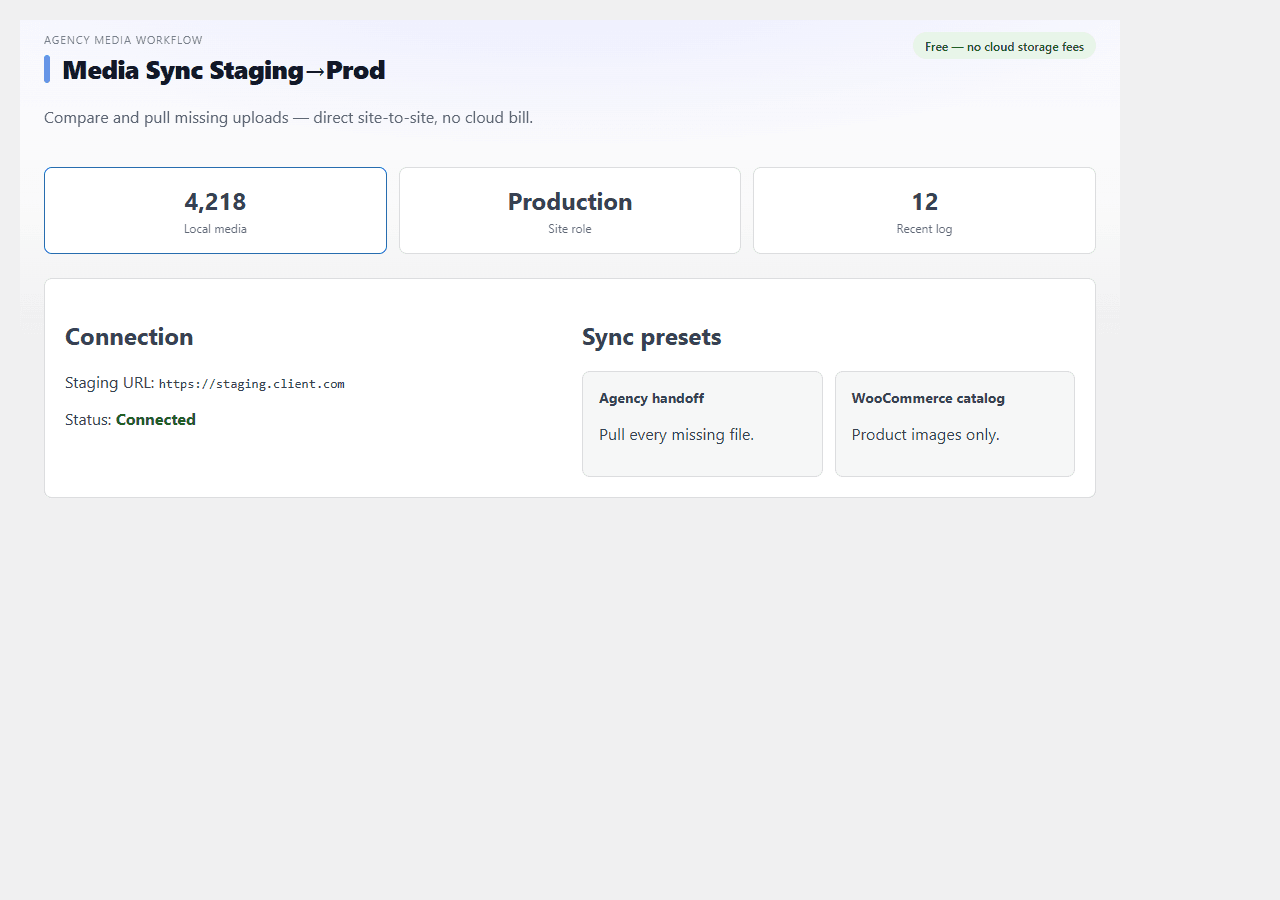
Production asks staging for a manifest, diffs against local uploads, then pulls only missing files over REST.
1 · Connect
Production stores staging URL + shared key — ping verifies REST reachability.
2 · Manifest
Staging returns hash-indexed file list — filter by date or WooCommerce attachments.
3 · Compare
Production diffs remote manifest vs local uploads — dry-run lists gaps safely.
4 · Pull
Missing files download over REST and register in the media library with metadata.
Live compare output
Staging (source)
staging.client.com
Production (dest)
client.com
GET /wp-json/mssp/v1/manifest → 1,247 files indexed
Local scan → Missing: 83 | Hash mismatch: 2
Pull complete → 83 imported, 0 skipped, 2 flagged for review
Wann Multi-Shop-Sync nutzen?
Zwei WooCommerce-Shops, ein Katalog.
B2C + B2B
Situation: Produkte in beiden Shops manuell pflegen - 100 SKUs = doppelte Arbeit
Mit MSSP: B2C -> B2B: Preis, Lager, Bilder syncen
Einmal pflegen
DE + FR Shop
Situation: Ubersetzte Produkte in 2 Shops - Katalogabweichungen
Mit MSSP: Stammdaten syncen, nur Beschreibungen pro Shop
Konsistenter Katalog
Agentur - Kunden-Shops
Situation: 5 Kunden-Shops, jeder einzeln konfiguriert
Mit MSSP: Zentralen Sync fur Einstellungen und Zahlungsarten
Vereinheitlichte Konfiguration
Multi-Shop-Sync, kein Middleware-SaaS
Produkte, Bestellungen, Kunden und Einstellungen zwischen WooCommerce-Shops - ohne externen Service.
4 Sync-Richtungen
A->B, B->A, bidirektional oder getrennt pro Entitat.
Produkt-Sync
Titel, Beschreibung, Preis, Lagerbestand, Bilder, Kategorien.
Bestell-Sync
Bestellungen von einem Shop zum anderen fur zentrales Reporting.
Kunden-Sync (V+)
Kundenkonten zwischen Shops teilen.
Einstellungs-Sync
Zahlungsarten, Versandzonen, Steuerklassen.
Konflikt-Auflosung
Letzter Schreibvorgang gewinnt oder Quell-Shop priorisiert.
Geplanter Sync (V+)
Stundlich oder taglich automatisch.
WP-CLI
mssp sync start, mssp status, mssp log.
Pair with WP Migrate DB Pro for database pushes — MSSP handles uploads only, site-to-site, with no cloud relay.
Public pricing as of July 2026 — MSSP covers the staging to prod uploads delta these tools bundle or upsell.
WP Migrate DB Pro + Media
~$199/yr
Delicious Brains DB + Media bundle — powerful for full migration, heavy if you only sync uploads.
All-in-One WP Migration Unlimited
~$69
Unlimited size extension — full ZIP export/import, no REST site-to-site incremental sync or manifest dry-run.
Duplicator Pro
~$59/yr
Full-site packages — great for one-shot cloning, not weekly staging to prod delta without re-packaging.
WP Offload Media + S3
~$79 + AWS
Offload to cloud bucket — AWS storage and egress on top, data residency and credentials to manage.
Media Sync Staging to Prod by Volade
$0
Direct REST staging to prod pull — 4 presets, hash dry-run, JSON export, zero cloud middleman.
MSSP vs. die Alternativen
WooCommerce-nativ, kein Mittelmann.
Manueller Export/Import
Kostenlos, aber jede Anderung = manueller Schritt. Kein kontinuierlicher Sync.
Limit:
Middleware (Zapier, Celigo)
Leistungsstark - aber teuer und komplex fur 2 Shops. Extra Abonnement pro Task.
Limit:
WP All Export + WP All Import
Gut fur einmalige Migration - nicht fur dauernhaften Sync zwischen 2 Shops.
Limit:
MSSP by Volade
WooCommerce-nativ, kein SaaS, 2 Shops kostenlos, WP-CLI, geplant.
Limit:
Funktionsvergleich
MSSP vs. Middleware vs. manuell.
MSSP syncs media, content database (no users) and ZIP packages site-to-site. « V+ » = network multisite rollup on premium roadmap.
| Funktion | MSSP Volade | WP Migrate Media | Paid sync plugins | Manual FTP | rsync SSH | Cloud relay |
|---|---|---|---|---|---|---|
| Kostenlos ohne Konto (1 Paar) | ||||||
| 4 Sync-Richtungen | ||||||
| Konflikt-Auflosung | ||||||
| Geplanter Sync | ~ | |||||
| WooCommerce-nativ | ||||||
| WP-CLI | ||||||
| Preis | Kostenlos |
WP Migrate DB Pro Media: ~$149/year add-on. All-in-One Unlimited ~$69. Duplicator Pro ~$59/yr. WP Offload ~$79 + AWS. rsync: SSH required. MSSP v1.1.0 by Volade — zero cloud storage fees, free without account.
Drei Stufen, ein Plugin
Ein Shop-Paar und 4 Sync-Richtungen sind kostenlos ohne Konto. Volade-Konto fur Konflikt-Auflosung und Protokoll. V+ fur mehrere Paare und Bidirektional.
No account
- Unlimited compare + pull
- 4 ready-made presets
- Shared key site-to-site REST
- Sync activity log
- JSON export
- WP-CLI wp mssp commands
Volade account
- Everything in Free
- Extended sync log retention
- CSV export of sync history
- Scheduled pull via cron helper
- Email alert on pull failure
V+ Premium
- Everything in Connected
- Multisite network rollup dashboard (V+ roadmap)
- WP-CLI batch pull across sites
- Priority support
- White-label client handoff PDF
WP-CLI-Trigger und Setup von mehreren Shop-Paaren fur Agenturen.
WP-CLI
Starte den Sync per SSH oder planbaren Cron - ohne das Dashboard zu offnen.
wp mssp compare
wp mssp pull --preset=recent_30
wp mssp export
Multisite
MSSP arbeitet unabhangig von Multisite. Jede Seite kann mit einer anderen MSSP-Instanz verbunden werden.
- Per-subsite staging URL + key mapping
- Network-wide sync status rollup on V+
- wp mssp pull --url=subsite.prod.example
- JSON export per site for client reports
Download
Installiere das ZIP auf jedem Shop, erstelle eine Sync-Verbindung, wahle die Richtung - Daten fliessen zwischen Shops.
ZIP with Volade SDK — install on both sites, set staging URL + shared key on production, then compare and pull.
- 1Plugins → Add New → Upload → select ZIP → Activate on staging and production
- 2Staging: Volade → Media Sync → copy shared key. Production: paste staging URL + key
- 3Run dry-run compare → pick a preset → Pull missing files → Export JSON
First sync configured in under 5 minutes
FAQ
Sync-Richtungen, Konflikte, Multisite und Volade-Konto.
Kostenlos ohne Konto: 1 Shop-Paar (2 Shops). Mit Volade-Konto: gleiches Paar mit Konflikt-Auflosung. V+: mehrere Shop-Paare.
Kostenlos vs V+ Premium
Die Erweiterung funktioniert ohne Konto. V+ schaltet Premium auf dieser Erweiterung und dem gesamten Katalog frei.
| Funktion | Kostenlos | V+ |
|---|---|---|
| Installation & configuration de base | ||
| Mises à jour automatiques | ||
| Support communauté | ||
| Fonctions avancées & exports | ||
| Quotas & limites relevés | ||
| Automatisations & intégrations pro | ||
| Licence multi-sites (selon formule V+) |
Bewertungen, Diskussionen & Updates
Teile deine Erfahrung mit Media Sync Staging to Prod by Volade und verfolge die neuesten Veröffentlichungen.
Bereit, deine Shops zu synchronisieren?
Lade Multi-Shop Sync by Volade v1.0.0 herunter - 2 Shops synchronisieren, kein Konto.
Download v1.1.0