DAM Asset Manager by Volade
Collections, expiry, usage — native WordPress.
DAM Asset Manager by Volade adds a lite DAM layer to your media library: collections, tags, expiry, usage tracking, audit trail — 4 presets, no mandatory CDN SaaS.
3-step workflow
- 1Open Volade → Asset Manager
- 2Apply brand-kit, marketing-images, product-photos or press-kit
- 3Insert [dam_gallery] / [dam_asset] — manage collections & expiry
WordPress DAM 2026
Cloudinary bills — Drive scatters — media library ignores expiry
Creative teams want collections + tags + expiry on their WordPress.
🖼️ DAM
Assets in wp-admin
Collections, assets, usage tracking, audit trail, [dam_gallery] / [dam_asset], presets, JSON export — native DAM layer, no Cloudinary required.
Collections
Tree structure
4
Presets
2
Shortcodes
JSON
Free export
At a glance
Cloudinary cobra, Brandfolder es enterprise, la biblioteca de medios WP ignora expiración y colecciones. DAM Asset Manager by Volade v1.0.0 añade una capa DAM lite nativa WP: colecciones, assets, expiración, seguimiento uso, audit, shortcodes [dam_gallery] / [dam_asset], cuatro presets (brand-kit, marketing-images, product-photos, press-kit) y export JSON — gratis sin cuenta. No es Cloudinary. Los derechos de assets son responsabilidad de la organización.
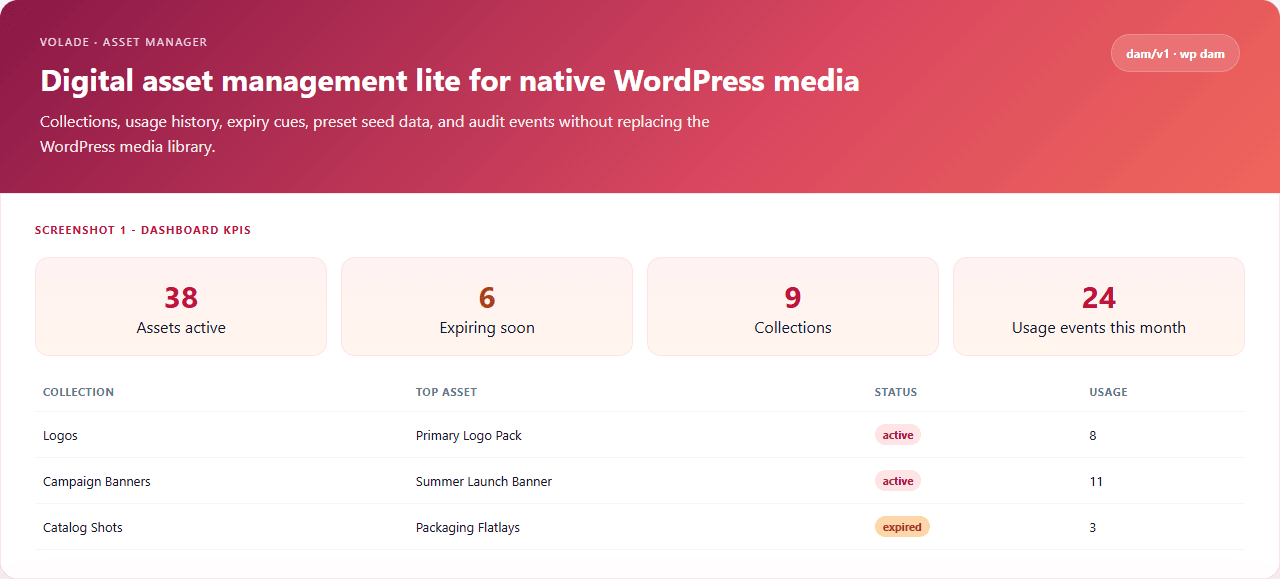
Capturas de pantalla
UI de administración real a página completa: ajustes predefinidos, diagnósticos y configuración detallada.
2026 tooling compare
Cloudinary + Drive, or DAM at $0
Cloudinary bills by volume. Drive scatters. WP media library ignores expiry and collections.
Free core · 4 presets · expiry · usage · JSON export
SaaS
Typical DAM stack
$0
DAM Asset Manager Volade
Why creative teams still stack Drive + WP media library + Notion
Cloudinary bills by volume; the WP media library has no collections or expiry; Drive scatters.
The creative team DAM problem
You need a DAM layer — not a mandatory CDN SaaS.
Cloudinary bills. Brandfolder is enterprise. Drive scatters. The WP media library handles neither expiry nor collections.
- Cloudinary: billed by volume, not native WP
- Brandfolder / Bynder: enterprise / overkill
- WP media library: no collections or expiry
- No controlled public gallery shortcode
- No per-asset usage tracking
- No CLI / REST for agency fleets
The Volade answer
Collections, assets, expiry — from wp-admin.
DAM extends the WP media library, exposes shortcodes, and ships 4 demo presets — no CDN required.
- Dashboard Volade → Asset Manager
- Collections (parent/child tree)
- Assets linked to WP attachments (alt, tags, expiry)
- Usage tracking (post/URL/manual context)
- Version label stub
- Shortcodes [dam_gallery] and [dam_asset]
- 4 presets: brand-kit, marketing-images, product-photos, press-kit
- Audit events + JSON export + wp dam
4 asset presets
Brand kit, marketing images, product photos or press kit — one click.
Brand kit
Logos, colors, brand assets.
brand-kitMarketing images
Campaigns, social, banners.
marketing-imagesProduct photos
E-commerce — product media.
product-photosPress kit
Press photos, bios, media kit assets.
press-kit4 asset cycle readings
Active, Archived, Expired and Pending — clear asset management.
Asset in current use.
Kept outside active use.
Expiry date passed — renew.
Awaiting validation.
Statuses and expiry help detect stale assets without a CDN.
Same day, DAM live on the site
brand-kit preset — live gallery, expiry in admin.
Preset
brand-kit applied.
Shortcode
[dam_gallery collection="logos"].
Expiry
Expiring assets on dashboard.
Export
dam-export.json for backups.
Collections preview
Brand kit — 3 collections · 18 active assets
Expiry + usage + JSON export for the team.
Real scenarios
What changes after activation.
Branding agency
Before: Drive + Notion
After: brand-kit
Brand centralized
Marketing
Before: Unsorted media library
After: marketing-images
Campaigns filed
E-commerce
Before: Scattered photos
After: product-photos
Products grouped
PR
Before: Drive ZIP
After: press-kit
Live gallery
What Cloudinary and the media library alone do not offer
Collections, tags, expiry, usage tracking and audit — in wp-admin, no mandatory SaaS.
Collections
Parent/child tree with color.
Assets
Linked WP attachments — alt, tags, expiry, version.
Usage tracking
Post/URL/manual context per asset.
Expiry
Deadline date + dashboard alerts.
Shortcodes
[dam_gallery collection=""] and [dam_asset id=""].
4 presets
brand-kit, marketing-images, product-photos, press-kit.
Audit trail
Timestamped events on key actions.
WP-CLI + REST
wp dam · dam/v1 status / export.
Lite native WP DAM — not Cloudinary/Brandfolder, no integrated CDN.
What teams use
July 2026 landscape — WordPress vs external tools.
Cloudinary
SaaS
CDN + transform — billed by volume.
Brandfolder / Bynder
Enterprise
Enterprise DAM, SMB overkill.
WP media library
Limited
No collections or expiry.
Google Drive photos
Fragmented
Scattered, not native WP.
Nothing
Chaos
Expired assets undetected.
DAM Asset Manager by Volade
$0
Collections, expiry, [dam_gallery], 4 presets, REST + CLI.
DAM × WordPress landscape 2026
Cloudinary, media library, Drive vs a wp-admin DAM layer.
Cloudinary
CDN + transform SaaS.
Limit: Billed by volume, not native WP.
Brandfolder
Enterprise DAM.
Limit: Overkill / SMB cost.
WP media library
Media files.
Limit: No collections or expiry.
Google Drive
Cloud storage.
Limit: Scattered, not native WP.
Notion gallery
Visuals in Notion.
Limit: Outside WordPress.
Do nothing
Unmanaged assets.
Limit: Expirations undetected.
Comparison table — 5 approaches
DAM vs Cloudinary, WP media library, Drive and no tool.
| Feature | DAM Volade | Cloudinary | WP media library | Drive photos | Nothing |
|---|---|---|---|---|---|
| Native WP collections | |||||
| Expiry + alerts | ~ | ||||
| Per-asset usage tracking | ~ | ||||
| Industry presets | |||||
| Shortcodes [dam_gallery]/[dam_asset] | ~ | ~ | |||
| JSON export + WP-CLI | |||||
| No mandatory SaaS (core) | ~ | ||||
| Data on your server | |||||
| Typical yearly cost | $0 | SaaS | $0 | Cloud | $0 |
Not a CDN/Cloudinary. No AI tagging engine. Asset rights remain with the organization.
Three tiers, one plugin
Collections, assets and JSON export free. Volade account for REST. V+ for multisite rollup.
No account
- Collections & assets
- Expiry & usage
- 4 presets
- Shortcodes
- JSON export
Volade account
- REST dam/v1
- Stats
- Remote sync
V+ Premium
- Multisite rollup
- wp dam network
- Fleet harmonization
WP-CLI `wp dam` and REST `dam/v1` for status, preset, list and export.
WP-CLI
status, preset, list, export — `wp dam preset brand-kit`.
wp dam status
wp dam preset brand-kit
wp dam export
Multisite
Collections per site; network presets; rollup on V+.
- Assets per blog
- Consolidated export
- Network presets
Download
Install the ZIP, open Volade → Asset Manager, apply brand-kit.
ZIP with Volade SDK — Volade → Asset Manager.
- 1Plugins → Add New → Upload → ZIP → Activate
- 2Volade → Asset Manager
- 3Pick a preset → paste [dam_gallery] → manage collections & expiry
DAM live in under 2 minutes
FAQ
Cloudinary, WP media library, shortcodes, presets, REST, multisite and rights.
No. DAM Asset Manager is a lite native WP DAM layer. No CDN or AI tagging engine.
Gratis vs V+ Premium
La extensión funciona sin cuenta. V+ desbloquea premium en esta extensión y en todo el catálogo.
| Característica | Gratis | V+ |
|---|---|---|
| Collections, assets, expiry & suivi usage | ||
| 4 presets brand-kit / marketing-images / product-photos / press-kit | ||
| Shortcodes [dam_gallery] / [dam_asset] & audit events | ||
| Dashboard & export JSON gratuit | ||
| API REST dam/v1/* programmatique (connected) | ||
| Rollup reseau & multisite |
Reseñas, debates y novedades
Comparte tu experiencia con DAM Asset Manager by Volade y sigue las últimas versiones.
Ready for a native DAM on WordPress?
Download DAM Asset Manager by Volade v1.0.0 — one-click preset, no signup.
Download v1.0.0